The post The benefits of automation for small business. appeared first on Yellow Pages.
]]>From a technological advancement perspective, the next five years could bring significant disruption. In 2019, McKinsey estimated that 44% of work activities in Australia were already capable of being automated, with projections suggesting up to 81% of tasks could be automated by 2030, depending on the speed of adoption. More recent analysis now suggests this figure has climbed to 98%, underscoring the accelerating impact of automation on the workforce.
While bigger businesses have been leveraging automation for years, small to medium businesses have been slower to get on the technology train. Smaller businesses may be put off by the cost, the belief that they don’t need a new solution, or the perception that automation removes that ‘personal touch’ small businesses are known for.
In fact, SMBs can reap major benefits from automation. Because they have fewer admin staff and smaller budgets, SMBs spend a higher proportion of time on repetitive manual tasks. A recent survey found that small Australian businesses spend, on average, $79,000 a year on admin tasks. The more of these tasks you can eliminate, minimise, or streamline through automation, the better the outcome for your bottom line.
Here’s how automation could change the way you work:
Cut quoting and invoicing costs.
Think about all the steps involved in sending an invoice. Generating the document, printing or emailing, reminding and following up if a customer doesn’t respond — it all adds up. That’s why, according to the Australian Tax Office (ATO), it costs over $30 to process a single paper invoice. And a surprising number of Australian businesses still rely on paper invoicing or other manual systems. Even PDF invoices, which seem more efficient, cost an estimated $28 each. In contrast, the ATO estimates, e-Invoices cost just $10 each. Even if you only send ten or twenty invoices a week, that quickly adds up.
Quoting can also be expensive. Estimating and generating quotes, sending them to customers, and — again — following up takes time and often ends without a sale. It’s another crucial admin task that takes longer than it should.
Automation benefits.
With an integrated CRM or other business management system, all your business data, including quoting and invoicing details, is accessible through a single platform. Instead of transferring numbers from one system to another — for example, from your sales software to your invoicing app — you get an auto–generated invoice or quote with all the relevant customer and sale details included. Rather than sending an email or PDF to your client, invoices are shared directly from your software.
Similarly, automated quoting saves significant time and energy for your team. Instead of preparing and sending each quote to prospects, you can quickly generate quotes using customer data and information about past projects. Send them through your business management platform, customers accept with a click, and you’re off.
Of course, automation isn’t just about saving time and money — it also means fewer errors and quicker responses from your clients. If you can reduce the number of steps between the client and payment, they’re more likely to pay promptly.
Simplify payments and reminders.
Business owners would love it if a prompt, straightforward payment followed all invoices, but that’s not always the case. In fact, the average time for an invoice to be paid in Australia is around 22.1 days, however this can fluctuate depending on industry and company size. A late payment means more work for you, with reminder notices, email follow-ups and finally, the debt collection process.
Not only do late payments cost you in time, but they also affect your cash flow. Every day a payment isn’t in your bank account, you’re losing out on interest and access to ready cash.
RELATED: CRM-based quoting and invoicing: The key to streamlining your sales process.
Automation benefits.
Again, automation can be a lifesaver. Invoicing becomes more straightforward, which in turn, makes payments simpler and quicker. Many business management platforms include an instant online payment option with invoicing — customers can click to pay (by card or online banking). Removing the barriers to payment is likely going to improve payment times.
Finally, automation can also help with chasing up overdue payments. Set up automated reminder emails at one, three and six weeks, for example, instead of manually combing through unpaid invoices and writing manual reminders. Your platform should also be able to automatically flag any that are very overdue, so you can follow up in person or push them through to debt collection.
Make digital marketing run smoothly.
You know you need to post on social media, send regular newsletters or eDMs and follow up with customers promptly — but it can be challenging to keep up when you’re running a small business with a small team. And if you’re managing all your marketing manually, it’s easy to see how email follow-ups get forgotten, newsletters rarely go out and social media posting becomes patchy.
That’s where marketing automation comes in – if you’re not keeping up with these customer touch-points, you can end up missing out on sales while giving customers an inconsistent or disappointing experience with your brand.
Read our recently published article on how to streamline and automate your marketing efforts for more tips on how to effectively simplify your small business marketing in 2025 and beyond.
Automation benefits.
Marketing automation can help you create a consistently positive customer experience without hours of manual work. This can look like setting up a social media schedule to keep social posts flowing even when you’re busy. Or you can use a specific action to generate an email. For example, set an email — asking for a review or nudging your customer about items left in their online cart — to auto send a week after a purchase.
Some businesses create a ‘nurture journey’ — a series of emails triggered by a customer action, such as email signup or content download. These journeys are designed to deliver a cascade of information about your business and your product or services, eventually guiding the customer to a conversion.
Automation is the only way to efficiently manage that complex email journey and ensure every customer has the same experience with your brand. That’s probably why 63% of marketers use automation to manage their email marketing.
AI tools like ChatGPt have also helped streamline marketing and internal business processes even further, but you need to know how to effectively use them and more importantly, which prompts to use.
RELATED: Improve your small business marketing with these ChatGPT prompts.
Does automation equal de-personalisation?
Many small business owners pride themselves on their personal service and relationships with customers. After all, that’s what sets you apart from larger corporations. For some SMB owners, automation doesn’t seem to fit with the idea of this personal touch. If you’ve always made a point of making personal connections, it can seem counterintuitive to hand over control to an automated system.
The good news? Automation doesn’t mean ceding control — and it doesn’t mean your customers will have a dry, corporate experience. Because automation platforms are so flexible, you can choose the elements you want to automate and those you want to manage on your own. For example, you might choose to automate invoicing, quoting, review requests and email follow–ups, but continue to contact new leads personally.
You can also use your automation platform to create those personalised moments for your customers. Using customer data, you can personalise email contact with customer names and other details — for example, recommending complementary products with a purchase. It’s about weaving personal touches in with time-saving automation.
Automation: key benefits for SMBs.
In a world where 68% of employees suffer from work overload, the majority of business owners want to take at least some of that pressure off. The smaller your team, the more important it is to eliminate and streamline the manual tasks that can eat into productivity and lead to burnout.
This is where automation can deliver tangible benefits:
- Time savings are the most obvious – one report found that employees could save up to three hours a day by automating manual tasks
- Reduced stress for employees, fewer missed deadlines and more time available for business–building activities
- Time translates into money, so those hours equate to financial benefits for your business as well
- This could mean that you need to hire fewer employees, or help you get more value from the employees you already have
- Less frustration and fewer unhappy customers – because customer and transaction information flows from one integrated system, you’ll have fewer errors
- Improve your relationship with your customers by creating a consistent, streamlined customer experience through email and social media automation
- Some business owners fear de-personalisation as a result of automation, but it can actually help you deliver more positive experiences and consistently excellent service.
Your automation toolkit.
Ready to reap the benefits of automation in your small business? It’s all in the platform. With hundreds of business management and CRM platforms on the market, it can be hard to find the one that will suit you best. If you’re running an SMB, you may not need a hyper-complex — or expensive — system. But you do need something that can deliver the time-savings, integration and efficient workflows that will help your business grow.
That’s where Thryv comes in. Based in Australia, it’s an all-in-one business management platform created for SMBs. Manage everything — from invoicing and payments, to reviews and social media, to marketing and scheduling — through a simple, user-friendly dashboard. Thryv is designed to automate the busywork, leaving you with more time to focus on the things that will really make a difference to your small business
Reap the benefits of business automation with Thryv – Get your free demo here.
The post The benefits of automation for small business. appeared first on Yellow Pages.
]]>The post What is marketing automation and how can it help you? appeared first on Yellow Pages.
]]>That’s why marketing automation has become one of the most useful tools in any marketer’s toolkit.
- More than half of all companies now incorporate marketing automation into their processes
- The marketing automation industry is projected to grow significantly, with global market value forecast to surpass $8.4 billion by 2027.
- Nearly half of small businesses are already using automation tools to support their marketing efforts.
- Personalised experiences make a difference — 4 out of 5 consumers say they’re more likely to buy from brands that tailor their messaging.
- A growing number of marketers — around 70% — planned to expand their use of automation tools last year.
Source: https://www.smbguide.com/marketing-automation-statistics/
In this guide we’ll discuss what marketing automation really is, explain how it works, cover why it’s so beneficial and run through some of the major tools available. We’ll also go into how to use it best, mistakes to avoid, and how to know if marketing automation software and tools are right for your business.
RELATED: How to declutter and simplify your marketing.
What is marketing automation?
Marketing automation is various types of technology that automatically complete tasks that were once completed manually.
Marketing automation tools and software help manage multiple aspects of the marketing process across multiple channels, meaning that it can help marketers with everything from social media management, to direct email campaigns and display advertisements.
Automation can assist marketers and business owners at any stage of the sales funnel, from lead generation to the final sale, making it a ubiquitously useful tool.
A simple example of marketing automation is when you set up a system to automatically send customers a message exactly one week after a purchase to ask for a review or feedback. In the past, marketers may have manually sent out such emails following purchases, but automation ensures these emails land in client inboxes with minimal manual input.
In short, automation makes marketing easier. It lightens the load and frees up your time to use more productively elsewhere.
RELATED: Why using AI is a must for small businesses.

A brief history of marketing automation.
Marketing automation has its roots in the early 2000s when companies began to develop software that could automate routine marketing tasks. One of the first marketing automation platforms was launched in 2004 by a company called Pardot. Since then, the industry has grown rapidly, with new players entering the market and existing ones expanding their offerings.
In the early days, marketing automation was primarily focused on email marketing and lead nurturing. However, as technology advanced and customer expectations evolved, marketing automation platforms began to incorporate more features, such as social media management, content management and analytics.
Today, marketing automation is a critical component of modern marketing strategies, enabling businesses to streamline their marketing efforts, improve efficiency and enhance customer experiences.
How does marketing automation work?
Modern day marketing is an industry of data and most managers and marketers are drowning in it. From customer demographics to A/B testing results, click-through rates, abandoned carts, ROI and so much more. There are endless amounts of data and countless ways to use it.
Marketing automation takes that data and immediately turns it into practical, effective actions.
For example, automation software can take your entire email database and filter the customers into various groups depending on their stages in the customer journey, then send each one a tailored message. This ensures customers who have just made a purchase don’t receive a discount offer that would make them regret their purchase, whereas new customers do receive a discount offer to encourage them to make their first purchase.
RELATED: Set it and forget it marketing for the holidays.
Importance of marketing automation in a modern marketing strategy.
Marketing automation is essential in modern marketing strategies for several reasons:
- Increased efficiency: Marketing automation helps businesses automate routine tasks, freeing up time for more strategic and creative work
- Improved customer experiences: By automating personalised messages and offers, businesses can create seamless and relevant customer journeys
- Enhanced data analysis: Marketing automation platforms provide valuable insights into customer behaviour, enabling businesses to make data-driven decisions
- Better lead management: Marketing automation helps businesses nurture leads and convert them into customers, improving sales and revenue
- Competitive advantage: Businesses that adopt marketing automation are better equipped to compete in today’s fast-paced digital landscape.
What kinds of marketing automation tools are available?
Marketing automation is not one tool, but many. Utilising a marketing automation solution can enhance employee productivity by reducing manual tasks, allowing teams to focus on strategic initiatives.
There are numerous ways marketers can automate their workflows and the customer journey and you can pick and choose which tools would be most beneficial for your business model.
Email automation.
One of the simplest and most commonly used forms of automation, email automation is easy, effective and efficient. This is when a program is set up to send out emails in response to certain triggers.
For example, if a customer abandons their shopping cart, an automatic email may be sent two hours later offering a discount code and a reminder to finish checking out.
Social media automation.
Social media marketing automation is a tool that handles all of the mundane parts of social media management, such as scheduling, posting, cross-posting and responding to frequently asked questions.
CRM automation.
Customer Relationship Management automation is when a CRM program pulls together customer data in one convenient place. This allows those on the marketing team to quickly pull up information, such as groups of customers based on demographics or information about a single customer and where they are in the sales funnel.
Analytics automation.
Like CRM automation software, analytics automation is also an internal form of automation. It doesn’t directly interact with customers, but it does automate large portions of a marketer’s work.
Analytics automation measures the performance of various strategies, providing fast tabulated results for your marketing efforts.
For example, Google Analytics is one of the most common analytics automation products. It pulls together data on your strategies, such as display ads and pay-per-click search engine marketing campaigns, and shows you important website data, such as your bounce rate and session duration, plus much more.
Marketers can then use this data to make educated decisions about weak points that need to be improved (such as a high bounce rate), or areas that are performing well and could be further optimised (such as keyword investment).

How to implement marketing automation: Best practices.
Marketing automation is an exceptional tool but, like any tool, it’s much more effective in the hands of a professional. Up-skilling and learning as much as possible about your specific automation software can pay real dividends when it comes to results, but in general, there are best practices to keep in mind for designing a successful marketing automation strategy.
RELATED: The benefits of automation for small business.
Focus on the customer journey.
Customers at different stages in the funnel require different messaging and strategies, but you can’t put strategies in place without first fully understanding that funnel.
A good place to start is by creating a customer journey map. This map will grow and evolve as you gain a greater understanding of the journey, but it will help to inform your approaches and messaging (AKA how you wield your automation tools) from day one.
Marketing teams play a crucial role in this process, as they utilise marketing automation tools to improve collaboration and efficiency, automate repetitive tasks and enhance lead nurturing efforts.
Use lead scoring.
Lead scoring is a strategy where you assign ‘points’ to your customers as they hit certain targets in order to help you determine the most valuable leads. Automation will help you to do this.
For example, reading a blog might score a point, downloading a guide might score five points, signing up to a newsletter might score eight points and requesting a quote or consultation might score ten points. Your automation software will use these points to create a list of leads who score the highest – and are therefore more valuable to you as a customer and worthy of extra attention.
Learn everything you can about your customers.
Marketing automation relies on basic data, so the more data you have, the more accurate and valuable it can be.
Whether or not you already have a database of information, you can always find and add more with:
- Customer surveys (offer a voucher or reward for higher engagement)
- Audience analytics
- Information from contact forms
- Extra details from the sales team or rep who deals with them
Set goals.
Using marketing automation software without setting goals is a little like setting up display ads without setting goals. A target helps you to focus your efforts and work towards a goal rather than just setting it up and letting it loose.
Your goal could be anything from more click-throughs from email marketing to more check-outs following shopping cart abandonment, more time spent on site or better reviews.
Choosing the best marketing automation software.
Choosing the right marketing automation software is crucial for businesses to achieve their marketing goals. Here are some key factors to consider:
Evaluating software features and functionalities.
When evaluating marketing automation software, businesses should consider the following features and functionalities:
- Email marketing: The ability to create and send personalised email campaigns
- Lead nurturing: The ability to automate lead nurturing campaigns and workflows
- Social media management: The ability to manage and schedule social media content
- Content management: The ability to manage and optimise content across channels
- Analytics and reporting: The ability to track and analyse marketing performance
- Integration with CRM: The ability to integrate with customer relationship management (CRM) systems
- Customisation and flexibility: The ability to customise and adapt the software to specific business needs
- Scalability: The ability to scale the software as the business grows
- Customer support: The quality and availability of customer support and training
- Pricing and ROI: The cost of the software and its potential return on investment (ROI).
Is marketing automation right for you?
Marketing automation can work for businesses of all sizes, from small businesses just getting started and needing a hand to stay on top of the basics, to major multinationals who couldn’t get by without it.
And there are plenty of marketing automation platforms out there. A good one to get started with is Thryv, a clever piece of software that covers several automation bases – including CRM, email, social media and analytical automation – as well as a number of other useful business tools, such as booking, invoicing and quotes automation.
It basically brings all your productivity tools into one place, offers 24/7 support whenever you need it and creates an average 25% increase in customers (based on Thryv usage data).
Start a free trial of Thryv to try it out, or get in touch to find out more about how Thryv and marketing automation software can grow your business.
The post What is marketing automation and how can it help you? appeared first on Yellow Pages.
]]>The post Why first-party customer data is more important than ever. appeared first on Yellow Pages.
]]>With third-party cookies disappearing and privacy regulations tightening, first-party data collection has become essential. Why? Because this is data collected from direct interactions with your audience — people who already trust your brand enough to engage with you.
Whether it’s through website visitors, customer surveys, purchase history or email clicks, the insights you gain are not only accurate — they’re yours. This is your own data. And, used wisely, it can shape powerful marketing strategies, enhance the customer experience and help build long-term loyalty.

What is first-party data?
First-party data is the customer data your company collects directly through direct interactions — such as feedback forms, purchase transactions, website tracking tools or email engagement. It can include everything from basic contact details to customer preferences, customer behavior and even behavioral data tied to past purchases.
Unlike third-party data from external data providers or second-party data that you obtain through partnerships, first-party customer data is more reliable, more relevant and more respectful of privacy.
It’s also future-proof.
With data privacy laws making data sharing and audience tracking more complex, businesses that collect first-party data are better positioned to thrive in a privacy-first world.
Why is first-party data important for small businesses?
You don’t need to be a software company or tech giant to benefit from first-party data. In fact, using a strong first-party data strategy can help small businesses create better and more personalised experiences that truly resonate with their target audience.
Here’s why first-party data helps:
- It’s gathered through a direct relationship with your existing customers and social media followers
- It provides valuable insights into customer behavior, intent and preferences
- It increases data accuracy, leading to smarter marketing campaigns
- It ensures compliance with privacy regulations and builds trust through data transparency.
Best of all? It allows you to create personalised experiences based on actual customer actions, not assumptions.
RELATED: eBook: The small business guide to customer relationship management (CRM).
Ways to collect first-party data.
There are many ways to start collecting data directly. Here are some of the most common and effective methods:
1. Sign-up forms and lead capture tools.
These give you access to data points like name, location and interests — perfect for building a profile of your target audience.
2. Surveys and feedback forms.
Customer feedback is a powerful source of insight. Whether you’re specifically targeting respondents with NPS surveys or offering open-ended feedback options, this behavioral data can guide product improvements and service delivery.
3. Email and social media analytics.
Track engagement from your newsletters and social posts to identify customer preferences and trends in user behavior.
4. Website analytics.
Tools like GA4 help you track how website visitors move through your site, where they drop off and what content drives conversions. This can inform your marketing efforts and sales process.
5. CRM systems.
A strong customer relationship management platform is key to organising and activating your valuable first-party data. You can track the customer journey, review customer interactions and integrate tools to improve your marketing campaigns and outreach.
6. Competitions and gated content.
Encouraging people to enter competitions or download exclusive content gives you another avenue to collect directly — as long as you obtain explicit consent and clearly explain your data use.
RELATED: You’ve created your CRM database. Now what?

Best practices for first-party customer data collection and management.
1. Decide on what you really need.
Most small business owners have one thing in common: they’re time-poor. The reality is you probably don’t have a lot of spare time to be trawling through mountains of customer data every day. With this in mind, focus on the information that will be most useful to your specific business.
2. Be secure.
When you gather personal data about clients, it’s important to have a plan to keep that information safe. Most popular third-party platforms have robust security measures in place, but if you’re exporting that data to use anywhere else, make sure it’s stored securely and encrypted wherever possible.
3. Be ethical.
Trust is the foundation of successful customer relationships, and it’s crucial to make sure you’re transparent about your collection policies. Let customers know when you will be collecting their data (such as via surveys or competition forms) and include a privacy policy on your website that outlines how and when data may be used.
4. Invest in a CRM system.
As mentioned, a CRM system is incredibly handy for collecting and managing data in one place. Depending on the platform you choose, you can collect information directly via the CRM, import data from multiple sources, or both. This makes managing your data much more streamlined.
What does a CRM system do?
A complete CRM system does two things. Firstly, it keeps all your customer information in one spot. This includes:
- Contact details
- Appointments
- Service history
- Invoices paid and unpaid
Secondly, it delivers one simple platform to communicate to your customers from. This includes:
- Email marketing
- Appointment reminders
- Invoicing
Using a CRM template to compile customer data is also a good starting point if you’re new to the world of CRM and looking for a quick solution.
Once you get the hang of compiling and analysing simple customer data, you can import your database into a more sophisticated CRM platform with additional tools, like marketing automation and lead management.

Best practices for managing your first-party data.
Once you’ve started collecting first-party, zero-party or even second-party data, make sure you manage it ethically and effectively. Here’s how:
Focus on what matters.
Don’t overwhelm yourself with data you won’t use. Start with data points that support your most pressing marketing strategies or improve the customer experience.
Respect data privacy.
Transparency matters. Make sure your privacy policy is clear, and always manage user consent when asking for personal data. This helps you stay compliant with evolving data privacy laws.
Use the right tools.
CRM systems and customer data platforms can help streamline how you store, analyse and activate your first-party data. Choose tools that grow with you and support your ongoing process of data analysis and optimisation.
RELATED: What is a CRM system and how can you use it?
How to leverage first-party data in your business.
So what do you actually do with all this data collected? Here are a few ways to start leveraging first-party data in meaningful ways:
- Refine your marketing efforts based on real user behavior and campaign performance
- Deliver personalised experiences to your most engaged leads
- Use predictive analytics to forecast customer actions
- Segment by customer purchase history to trigger smart re-engagement sequences
- Improve your customer journey by identifying where customers are dropping off.
Every small business has the potential to turn first-party data into actionable strategy — it just takes consistency and a willingness to test, learn and adapt.
Final thoughts.
In a world without third-party cookies, first-party data is your most valuable source of insight — and a must-have for any smart data strategy. It gives you full control over how you connect with your target audience, measure success and build long-term loyalty.
By prioritising first-party data collection, respecting privacy and using the right tools to analyse and act on your insights, you’re setting your business up for smarter decisions and stronger growth.
Looking for a better way to manage your data? A platform like Thryv brings your customer relationship management, communications and marketing together — helping you leverage data with less manual effort.
Ready to unlock the power of first-party customer data? Book a Thryv demo today and see how easy it can be to connect, convert and grow.
The post Why first-party customer data is more important than ever. appeared first on Yellow Pages.
]]>The post Customer loyalty: How can your small business keep them coming back? appeared first on Yellow Pages.
]]>Customer loyalty isn’t automatic. It’s earned through every interaction — from quick online checkouts to detailed conversations in-store. The way your business shows up across different channels plays a huge role in shaping loyalty.
A seamless checkout process, helpful service, follow-ups or even a thank-you note can all make a difference. What loyalty looks like will vary depending on what you sell and how you sell it — but it always comes down to trust, consistency, and delivering value.
Here are our top loyalty and retention tips for small business owners:

Give rewards with a customer loyalty program.
Loyalty programs remain one of the most effective ways to build repeat business. In fact, most consumers say a great loyalty program makes them more likely to stick with a brand — and more likely to recommend it.
The key is finding the right fit for your existing customers. Would they appreciate discounts? Freebies after a certain number of visits? Exclusive access or upgrades?
Loyal customers spend more over time, and they’re more likely to choose you again even when there’s competition on price or convenience.
Whatever you offer, the program should feel valuable, easy to understand and genuinely rewarding. It should also align with your typical customer’s habits and preferences.
Use CRM tools to stay connected.
Customer relationship management (CRM) is essential to build a customer loyalty strategy — especially for small businesses that thrive on local trust and repeat customers.
A good CRM system helps you:
- Track customer details, preferences and purchase history
- Personalise communications and offers
- Follow up consistently after purchases or interactions.
The more engaged your customers are, the more they contribute to your overall customer lifetime value — making loyalty an investment, not a nice-to-have.
You don’t need a massive setup to make it work. Tools like Thryv can help streamline communication, automate reminders and create more meaningful touch-points — without taking up your whole day. Start your free demo today.
RELATED: What is a CRM system and how can you use it?
Communicate your business mission and values.
Customers are more likely to support businesses they connect with. A clear mission and authentic set of values can help people understand who you are and why you do what you do.
Whether it’s sustainability, quality craftsmanship or community support — share what drives you. Use your website, social media and in-store experience to reflect your values consistently.
When your values align with your customers’, you create stronger emotional connections — and greater brand loyalty as a result. People are loyal to people — not just products.
Make customer feedback count.
Even the best businesses receive negative feedback sometimes. What matters is how you handle it.
Encourage feedback at every stage of the customer journey, and show that you take it seriously. Make improvements where needed, respond openly and use criticism to fine-tune your offering.
When customers feel heard, they’re more likely to stick with you, even if things weren’t perfect the first time.
RELATED: 7 ways to maximise positive reviews of your business.
Create a consistent customer experience.
From your website to your customer service, consistency builds confidence. If someone has a great first interaction, they’ll expect the next one to be just as smooth, so focus on having satisfied customers.
Audit your digital and in-person touch-points. Is your branding consistent? Are your responses timely? Are your quotes and invoices clear and professional?
A consistent experience shows professionalism and reliability — two things that make customers more likely to come back.
RELATED: 8 benefits of offering business quotes to customers.
What are the 3 Rs of customer loyalty?
When it comes to turning first-time buyers into loyal customers, marketers often refer to the ‘3 Rs’ of customer loyalty:
- Rewards – Give your customers a reason to return, whether that’s discounts, freebies or VIP treatment
- Recognition – Show loyal customers they’re valued by personalising their experience and acknowledging their support
- Relevance – Make sure your communication, offers and values match what your customers actually want.
Mastering these three elements helps you build meaningful connections that last. This approach ensures that you not only retain customers but also cultivate the most loyal customers who become brand advocates and resist competition.
Quick loyalty checklist:
With so many brands competing for attention, building trust and repeat business is what makes customer loyalty important for small businesses today.
✅ Reward returning customers with value they care about
✅ Personalise interactions using customer data
✅ Keep service and branding consistent across all touch-points
✅ Listen to feedback and take action
✅ Share your mission and values clearly and authentically
✅ Cultivate truly loyal customers by fostering deep emotional connections and commitment.
Building loyalty doesn’t have to mean doing more — it’s about doing the right things, consistently. Start small, stay consistent and watch your regulars grow.
Measuring customer loyalty.
Measuring customer loyalty is essential for understanding how effective your loyalty strategies are and identifying areas for improvement. Several key metrics can help you gauge customer loyalty:
- Net Promoter Score (NPS): This widely used metric measures customer satisfaction and loyalty by asking, ‘How likely are you to recommend our brand to a friend or colleague?’ A high NPS indicates strong customer loyalty.
- Customer Loyalty Index (CLI): This standardised metric assesses the strength of a customer’s loyalty by asking questions about repeat purchases, multiple purchases and overall satisfaction.
- Customer Retention Rate: This metric measures the percentage of customers who continue to do business with you over time. A high retention rate signifies strong customer loyalty.
- Customer Satisfaction Score (CSAT): This metric evaluates customer satisfaction with a specific product, service, or interaction. High CSAT scores often correlate with loyal customers.
By tracking these metrics, you can gain valuable insights into your customers’ loyalty and pinpoint areas where you can improve.
RELATED: CRM implementation: What to do once your CRM database is live.
Help customers find you — and stay with you.
It’s been a long time since Yellow Pages was just a phone book. Today, we help small businesses across Australia show up where it matters.
From social ads to digital display, our advertising solutions help you attract the right customers — and give them a reason to return. Want to build loyalty that lasts? We’re here to help.
The post Customer loyalty: How can your small business keep them coming back? appeared first on Yellow Pages.
]]>The post CRM implementation: What to do once your CRM database is live. appeared first on Yellow Pages.
]]>That’s where CRM best practices come in.
A well-maintained CRM database can help you personalise customer interactions, reduce admin, and even automate parts of your sales process. But if you’re still staring at rows of names and wondering what to do next, this guide is here to help.
We’ll walk you through the next steps to take — from personalising your communication to using CRM sales automation — so you can turn that database into a smarter, more strategic part of your business.
RELATED: What is a CRM system and how can you use it?
Personalise with purpose.
One of the biggest benefits of a customer relationship management system is its ability to help you personalise communication at scale through effective contact management. Rather than sending the same generic message to everyone, you can use your CRM database to segment customers based on what they’ve bought, how they’ve interacted with your business or even how long they’ve been with you.
This kind of personalisation goes a long way — especially when customers are expecting more tailored experiences in 2025.
With the right filters and tags in place, you can:
- Send birthday offers or loyalty discounts to repeat customers
- Follow up with first-time buyers and introduce related services
- Target high-value clients with exclusive updates or early access promotions.
These are the types of CRM best practices that build trust, boost engagement and help you stand out in a competitive market.
💡 Pro tip: Think of your CRM not just as a record-keeping tool, but as a live customer insights hub. The more you update and use it, the smarter your marketing can be — and the more aligned your marketing and sales teams become in delivering consistent experiences.
RELATED : 5 ways a CRM system can improve your business.
Automate your sales process.
If you’re still manually sending follow-up emails or juggling reminders in your calendar, it’s time to let your CRM take the wheel. CRM sales automation allows you to create smart, repeatable workflows that keep leads warm, clients informed and your team focused on higher-value tasks.
With the right setup, your CRM can:
- Automatically follow up with new leads within minutes of an enquiry
- Trigger appointment reminders via SMS or email
- Send quote or invoice follow-ups without needing to chase anyone manually.
And that’s just the beginning. You can build entire sales sequences that respond to customer behaviour — like sending a thank you email after a purchase or checking in if someone hasn’t rebooked in a while.
These automated flows don’t just save you time — they also make your business look more responsive, reliable, and professional.
💡 Pro tip: Start small. Automate your most repetitive task first — like booking confirmations — then build from there. Most modern CRM platforms (like Thryv) make this easy with drag-and-drop workflow builders. Even a free CRM can offer basic automation features to get you started.
RELATED: The benefits of automation for small business.
Track performance and adapt.
Once your CRM is up and running, the real magic happens when you start analysing your results. Modern CRMs come with built-in dashboards and reporting tools that give you a clear picture of what’s working — and what isn’t.
By analysing your CRM data, you can also develop strategies to enhance customer satisfaction through targeted marketing and proactive customer service.
Tracking performance helps you answer questions like:
- Which email campaigns are driving the most engagement?
- Are your follow-ups converting leads into sales?
- Which sales reps or services are bringing in the highest revenue?
By regularly reviewing your CRM data, you can adjust your strategies in real time. Maybe a campaign needs tweaking, or your timing could improve — either way, you’ll have the insights to make smarter decisions.
This kind of adaptability is one of the core CRM best practices. It ensures you’re not just storing data, but actually using it to grow your business.
💡 Pro tip: Don’t just look at reports — act on them. If a lead source is underperforming, change your approach. If a campaign is thriving, double down — and keep your sales and marketing teams informed so everyone stays aligned.
Keep your CRM database and customer data clean and current.
A cluttered CRM can be just as bad as no CRM at all. As your database grows, keeping it accurate and up to date becomes essential. One of the most overlooked CRM best practices is simple: maintain good data hygiene. That starts with a clean data migration project — ensuring that when you first imported contacts into your CRM, the information was accurate, well-tagged and free of duplicates.
Here’s what that looks like:
- Removing duplicate contacts
- Updating incorrect or outdated details
- Tagging leads and customers correctly
- Archiving inactive or disengaged contacts.
A clean CRM database not only improves your targeting — it also keeps your automations and reports running smoothly. Poor-quality data leads to mistargeted emails, missed follow-ups and skewed analytics.
💡 Pro tip: Set a recurring task every quarter to review and tidy your CRM records. Even five minutes a week can make a big difference over time.
Use CRM software that supports best practice, not just storage.
Getting your customer data into a CRM system is a great start — but to really grow your business, it’s what you do next that counts.
By focusing on CRM best practices like personalisation, automation, performance tracking and data hygiene, you’ll turn that database into a powerful engine for customer satisfaction, sales and long-term loyalty.
And the best part? You don’t have to do it all manually.
Bring your CRM to life with Thryv for better customer relationships.
If you’re looking for a customer relationship management platform that makes these best practices easier, Thryv is designed for Aussie small businesses just like yours.
With built-in tools for CRM sales automation, customer communication, quoting, invoicing, and online booking, Thryv helps you get the most out of your CRM investment — without the overwhelm.
Ready to make your CRM data work harder? Book a demo and discover how Thryv can support your next step.
The post CRM implementation: What to do once your CRM database is live. appeared first on Yellow Pages.
]]>The post What is a CRM system and how can you use it? appeared first on Yellow Pages.
]]>CRM stands for Customer Relationship Management. A CRM system is a platform that helps businesses manage all their interactions with current and potential customers. It stores contact details, tracks communications, logs purchases and helps streamline everything from marketing to customer service — all in one place.
In other words, a CRM system makes it easier to build and maintain strong relationships with your customers, which is essential for long-term business success. Today’s customer relationship management software is built to do much more than manage contacts — it supports the full customer journey.

How CRM software works in your business.
Instead of storing customer data across different systems — bookings in one place, contact details in another, and payments somewhere else — CRM software keeps everything connected. It gives you one complete view of each customer, so you can easily track their interactions and tailor your service to suit their needs.
From the first contact through to ongoing communication, CRM tools help you personalise messaging, automate follow-ups and build stronger relationships. Many systems even track things like browsing behaviour, purchase history or service queries to help you improve the customer experience at every step.
The best CRM platforms grow with your business. Whether you’re managing 10 clients or 10,000, they help you stay organised, save time and deliver a better experience without the admin overload. This kind of contact management tool helps streamline workflows and makes it easier for sales and marketing teams to collaborate and act on insights from your CRM data.
Benefits of using a CRM system <H2>
A CRM system does more than store contact details — it helps you manage customer relationships more effectively and run a more efficient business.
Here’s how CRM software supports your day-to-day operations:
1. Personalised communication.
See what each customer has purchased, how they’ve interacted with your brand and tailor your messaging to suit their interests. This makes satisfied customers feel valued and understood.
2. Stronger internal collaboration.
With shared access to customer files, team members — including sales reps and support staff — can easily step in for one another and maintain consistency.
3. Smarter sales and marketing.
Use CRM analytics to spot buying patterns, see which products are frequently purchased together, and track which campaigns drive conversions. Sales and marketing efforts become more aligned, resulting in better leads and higher conversion rates.
4. Less admin, more impact.
Automate tasks like appointment reminders, follow-up emails and customer feedback requests. This enables your sales teams to focus on higher-value activities.
5. Big-picture strategy.
Over time, your CRM becomes a valuable source of business intelligence. Use CRM data and predictive analytics to forecast demand, fine-tune your sales process, and identify new opportunities for growth. This also helps increase customer lifetime value and builds greater brand loyalty among your existing customers.
RELATED: Customer loyalty: How can your small business keep them coming back?
Types of CRM systems.
There are three main types of CRM systems, each designed to support different parts of your business:
1. Analytical CRM.
Focuses on data and insights.
Use this to analyse customer behaviour and campaign performance. Great for marketers and business owners focused on long-term strategy and predictive analytics.
2. Operational CRM.
Designed to streamline everyday tasks.
Handles day-to-day tasks like sales automation, follow-up and service workflows. Ideal for driving growth and supporting your sales process.
3. Collaborative CRM (also known as strategic CRM).
Makes customer data accessible across departments.
Also called Strategic CRM, this type makes customer data accessible across departments — from sales to customer service — so everyone stays in sync.

Key features to consider in a CRM system.
When choosing a CRM platform, it’s not just about storing contacts — it’s about finding the right tools to help your business grow. Here are some common CRM features that deliver real value:
Marketing automation.
Automatically send emails, texts or follow-ups when a customer takes action.
Appointment and booking tools.
Let customers book online, get reminders and manage their own appointments.
Customer self-service.
Let clients access invoices, pay online or request support via a portal.
Location-based services.
Target campaigns based on physical location using GPS integration.
Lead management.
Track leads from first contact to sale, all in one place.
Workflow automation.
Automate repetitive admin like billing and follow-ups.
Analytics and reporting.
Use CRM tools to track performance and uncover trends in real time.
Most CRM platforms include tools for appointment scheduling, email marketing, lead tracking and analytics. These features help you manage customer interactions, personalise experiences and operate more efficiently.
RELATED: CRM-based appointment scheduling: Streamline your bookings and boost efficiency.
How do you use a customer relationship management system?
Using a CRM system doesn’t have to be complicated — especially if you choose one designed for a small business. Here’s how to get started and make the most of your CRM tools:
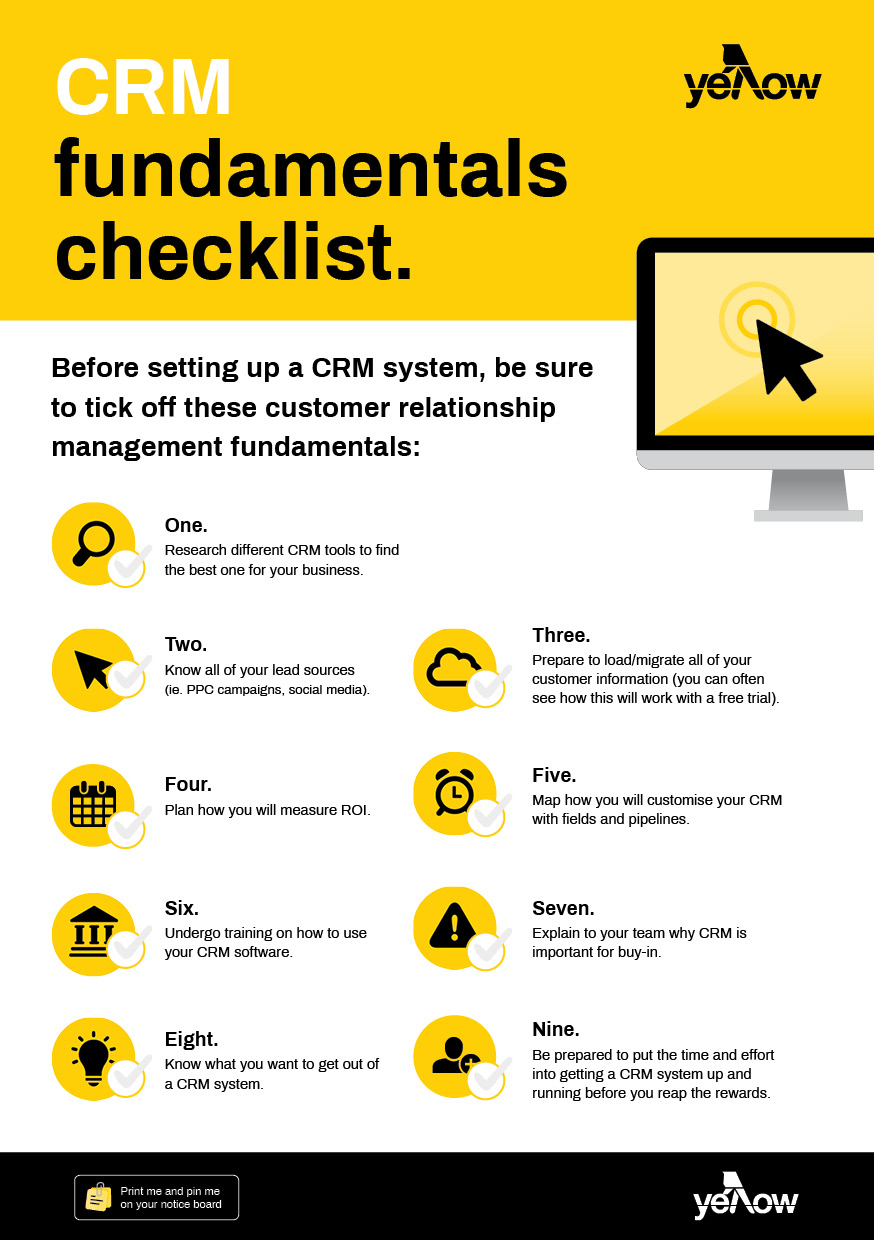
- Import your customer data – Bring in contacts, purchase history and any notes
- Set up your automations – Use workflows for follow-ups, reminders or welcome emails
- Customise your dashboard – Tailor the system to your needs (sales, marketing, support)
- Train your team – Ensure everyone, including your sales team, knows how to update records and manage leads
- Track your results – Use CRM reporting to refine what’s working and improve over time.
RELATED: 5 ways a CRM system can improve your business

What is the best CRM for your small business?
The best CRM software depends on your business goals, size and workflow — there’s no one-size-fits-all answer. But look out for:
- Ease of use – Simple interface & minimal training
- Customisation – Can be tailored to suit your team and process
- Scalability – Grows with your business
- Built-in automation – Saves time by automating routine tasks
- Ongoing support – Reliable help and product updates
Many platforms offer free trials so you can find the right fit before you commit.
Questions to ask before choosing CRM software.
When you’re in the midst of researching CRM systems, ask yourself the following:
- What are my main goals for using a CRM system?
- Which features are essential to my business?
- Can I easily import my current data?
- Will this CRM integrate with my existing tools?
- Does the provider offer support and training?
- Will this system grow with my business?
- How will I measure ROI?
Remember that taking the plunge without a well thought-out plan could lead to paying for a system that just isn’t right for your business – so it pays to do your homework ahead of time!
Organise your customers and your business.
With all of your customer information in one place, it makes sense to keep all of your business in one place too.
Thryv is an all-in-one platform built for small businesses in Australia. It includes CRM tools, quoting and invoicing, booking systems customer communication and more — so you can spend less time on admin and more time growing your business.
Want to see it in action? Get a demo and discover how Thyrv could work for you.
The post What is a CRM system and how can you use it? appeared first on Yellow Pages.
]]>The post 5 key benefits of CRM and how it can improve your business. appeared first on Yellow Pages.
]]>Many businesses start with a simple spreadsheet, but as they grow, a CRM becomes essential for managing sales, marketing and customer engagement in one place. Today’s CRMs go beyond storing contact details—they use automation and AI-driven insights to improve efficiency, increase revenue and strengthen customer loyalty.
Here are five of the biggest benefits of CRM software and how it can transform your business:
1. Retain and re-engage customers throughout the customer journey with AI-powered insights.
You’ve invested time and money to win a customer—don’t let that effort go to waste.
How a CRM system helps:
- Identify inactive customers and use segmentation to send automated re-engagement campaigns tailored to their purchase history and preferences
- Use AI-powered churn prediction to flag customers at risk of leaving before they disengage.
💡 Tip: The fewer steps between a customer and their next purchase, the better. Automating re-engagement keeps your brand top-of-mind without relying on manual outreach.
RELATED: What is a CRM system and how can you use it?
2. Identify and prioritise high-intent leads with AI and automation.
Not all leads are the same. Some are just browsing, while others are ready to buy—but how do you know which is which?
How a CRM system helps:
- Track lead activity across multiple channels (email, website visits, social media, chat interactions)
- Use AI lead scoring to rank prospects based on engagement levels
- Automate follow-ups to keep warm leads engaged until they’re ready to convert.
💡 Tip: The faster you respond to a lead, the more likely they are to choose your business. With a CRM system, you can automate this process and strike while the interest is high.
RELATED: The benefits of automation for small business.
3. Invest in the right marketing channels with data-driven insights.
Throwing money at random marketing efforts can be a waste. A CRM system shows where your best customers are coming from so you can spend smarter.
How a CRM system helps:
- Track which marketing channels drive the most valuable leads
- Integrate with Google, Facebook and TikTok Ads to optimise campaigns based on real sales data.
- Use predictive analytics to adjust ad spend before campaigns under-perform.
💡 Tip: Stop guessing where your customers come from. Use a CRM system with marketing analytics to measure real ROI and maximise your marketing dollars.
RELATED: You’ve created your CRM database. Now what?
4. Drive more revenue with automated up-selling and cross-selling.
Most businesses focus on getting new customers—but selling more to existing customers is easier and more profitable.
How a CRM system helps:
- AI-powered product recommendations suggest the best up-sells and cross-sells
- Automate follow-up emails with complementary product or service suggestions
- Track customer purchase history to personalise offers.
💡 Tip: Use CRM automation to offer up-sells at the right time—when a customer is already buying something.
5. Forecast sales and manage inventory with predictive analytics.
Instead of guessing how much stock you need or which services will be in demand, a CRM analyses past sales trends to predict future needs.
How a CRM system helps:
- Forecast demand based on seasonal trends and historical data
- Automate inventory alerts to prevent overstocking or running out of key items
- Adjust marketing and sales strategies based on data-driven projections.
💡 Tip: The best business decisions are data-driven. A CRM helps you plan ahead instead of just reacting.
Centralised data management with CRM software.
Single view of the customer: why it matters.
One of the biggest benefits of CRM software is its ability to provide a single view of the customer. This means all customer data—contact details, purchase history, past conversations and engagement records—is stored in one centralised system.
Instead of scattered information across different platforms, businesses can access a complete and up-to-date customer profile from one dashboard.
How a CRM system’s single customer view improves business performance.
- Personalised customer interactions – Sales and support teams can instantly access previous purchases and interactions, making every conversation more relevant and tailored
- Consistent service across teams – Whether a customer calls, emails or chats on social media, every department has the same updated information
- Stronger sales & marketing alignment – Sales can track leads more efficiently, while marketing can segment audiences and send personalised campaigns based on customer behavior
- Faster and more efficient support – Customers don’t have to repeat their history, leading to quicker resolutions and higher satisfaction
- Smarter decision-making – With all customer data in one place, businesses can identify trends, opportunities, and areas for improvement.
How Thryv helps businesses streamline CRM software and automation.
For businesses looking for a complete CRM solution, Thryv offers an all-in-one platform that integrates customer management, marketing, quoting, invoicing, and automation.
Why businesses choose Thryv:
- AI-powered customer insights help businesses engage the right leads at the right time
- Built-in marketing tools optimise campaigns for maximum ROI
- Seamless quoting and invoicing automates financial workflows and improves cash flow
- Multi-channel tracking ensures businesses never lose touch with a lead or customer
- Automated tasks and valuable insights provided by Thryv help improve customer service by streamlining operations and enhancing communication with customers.
Want to learn more? Explore Thryv’s CRM features here.
Who in your team will benefit from a CRM system?
A CRM system isn’t just for sales—it helps multiple teams work more efficiently by providing a centralised view of customer data and automating key tasks.
A CRM system benefits multiple teams across a business: Sales reps can prioritise high-intent leads and automate follow-ups; marketing teams can optimise campaigns and audience segmentation; and customer service teams can provide faster, more personalised support.
RELATED: CRM-based appointment scheduling: Streamline your bookings and boost efficiency.
FAQs about CRM systems.
Why should you use a CRM?
A CRM is great at making it easier for managing customer interactions, leads, sales, and marketing campaigns in one place. It streamlines operations, improves efficiency, and helps businesses build stronger customer relationships.
What is the greatest advantage of a CRM system? <H3>
The biggest advantage of a CRM is automation—it reduces manual work by automating lead follow-ups, marketing campaigns, invoicing, and customer communications, allowing businesses to focus on growth and service rather than admin tasks.
Additionally, automation in CRM systems streamlines the sales process, making it more efficient by managing leads and providing insights that help sales teams adapt their strategies and improve customer segmentation.
Is CRM really necessary?
If your business deals with multiple customers, leads or sales processes, a CRM is essential for staying organised, improving response times, managing the sales funnel and boosting conversions. Even small businesses can benefit by saving time and scaling efficiently.
What problems does a CRM system solve?
A CRM system helps solve:
- Lost leads and missed follow-ups – Automates reminders and customer interactions
- Inefficient sales processes – Provides data-driven insights to improve conversion rates
- Poor customer retention – Helps businesses engage and retain customers with automated communication
- Scattered business data – Keeps customer records, sales data and marketing insights in one place.
Why every business needs a CRM system.
The way businesses manage customer relationships is evolving fast. Without a CRM system, you’re wasting time on manual tasks, missing out on sales and struggling to track customer interactions.
With Thryv, reach a higher customer satisfaction with automation, AI-driven insights and multi-channel tracking—all in one powerful platform. Take control of your customer relationships and set your business up for long-term success.
The post 5 key benefits of CRM and how it can improve your business. appeared first on Yellow Pages.
]]>The post CRM-based appointment scheduling: Streamline your bookings and boost efficiency. appeared first on Yellow Pages.
]]>The way businesses manage appointments has changed dramatically over the years. Not long ago, scheduling was a completely manual task—handled with paper diaries, wall calendars, endless phone calls and the dreaded back-and-forth email chain just to find a time that worked.
For small businesses, this approach was time-consuming, prone to double-bookings and lacked any real way to track customer preferences or history.
As technology advanced, the shift toward digital scheduling began. Online calendars, booking tools and email reminders made life easier—but these tools often operated in isolation, disconnected from a business’s broader customer data. That’s where CRM-integrated scheduling tools stepped in, bringing the booking process into the same system used to manage customer relationships, sales and communication.
Today, an efficient, centralised system is essential. Customers expect a seamless experience, and business owners need more than just a calendar—they need a complete solution. CRM-based appointment scheduling offers exactly that: a smart, automated way to manage bookings, store client information, send reminders, and track interactions—all from a single platform.
Whether you’re a consultant, tradie or salon owner, having your appointments linked to your customer data is no longer a luxury—it’s a competitive necessity.
Why CRM-based appointment scheduling is a game-changer.
- Improves business efficiency – Reducing admin tasks by automating scheduling
- Enhances customer experience – Self-service booking, instant confirmations and reminders
- Keeps teams organised – Shared calendars, real-time availability and centralised records
- Strengthens customer relationships – Every appointment links to a customer profile, allowing businesses to track interactions and provide better service
- Drives more revenue – Fewer no-shows, easier re-booking and seamless payment processing.
Integrating appointment scheduling with a CRM streamlines customer interactions, centralises information, and enhances efficiency by managing appointments, reminders, and customer data all in one place.
Here’s a breakdown of how CRM and appointment scheduling work together, identifying the key features and benefits for small businesses.
1. Introduction: why appointment scheduling matters.
In service-based businesses, appointment scheduling isn’t just about managing your time—it’s a direct reflection of how easy it is for your customers to do business with you. A smooth, professional booking experience can build trust and encourage repeat business. On the other hand, missed appointments, double-bookings or clunky scheduling processes can quickly erode customer confidence.
Traditional methods like spreadsheets, notebooks or basic online calendars often fall short—especially as your business grows. They require manual oversight, increase the risk of human error and take time away from doing what you do best.
That’s where CRM-integrated appointment scheduling comes in. By combining customer relationship management with smart booking tools, you can automate your scheduling process, reduce admin and ensure your customers have a seamless experience every time they interact with your business.
2. Key benefits of CRM-integrated appointment scheduling.
Real-time availability and calendar syncing.
With CRM-based scheduling, your availability is always up to date. Bookings automatically sync with your calendar (Google, Outlook, etc.), eliminating the risk of double-bookings or time clashes. This is particularly valuable for businesses managing multiple staff, locations or service types.
Automatic confirmations and reminders.
Automated SMS and email reminders reduce no-shows and keep your customers informed. Once an appointment is booked, confirmations and reminders are sent without lifting a finger—saving time and preventing costly gaps in your schedule.
Centralised customer data for personalised service.
When your appointment system is integrated with your CRM system, every booking is linked to a customer profile. This means you can access service history, preferences and past communication at a glance—helping you deliver more personalised, professional service.
Self-service booking portals for customers.
Give your customers the flexibility to book when it suits them. Many CRM platforms offer custom booking pages or widgets you can add to your website, social media or email. This reduces phone tag and empowers clients to lock in appointments without waiting for a reply.
Fewer no-shows, better time management.
Between automated reminders, easy rescheduling options and calendar syncs, CRM-based scheduling dramatically reduces missed appointments. You’ll spend less time chasing people and more time focusing on high-value tasks.
RELATED: 5 Ways a CRM system can improve your small business.
3. Must-have features in CRM scheduling tools.
When evaluating a CRM system with appointment functionality, look for features that support both your team and your customers:
- Calendar integration – Ensure compatibility with platforms like Google Calendar, Outlook or iCal for real-time sync
- Buffer times and recurring appointments – Customise appointment lengths, build in prep time between bookings and manage ongoing services with recurring scheduling
- Mobile access – A responsive mobile interface allows you and your clients to manage appointments on the go
- Automated follow-ups – Send reminders, feedback requests or up-sell offers automatically after appointments
- Team and service-based booking – Let customers choose specific staff members or services, great for salons, consultants or clinics.
Thryv offers all these features in a simple, user-friendly interface—ideal for busy business owners who need a system that works without a steep learning curve.
4. Why businesses are choosing platforms like Thryv.
More service-based businesses are turning to platforms like Thryv for a reason. Thryv brings appointment scheduling, customer communication, invoicing, and marketing tools together in one platform, helping small businesses stay on top of every customer interaction.
With Thryv, you can:
- Share branded booking links with clients via SMS, email or social media
- Allow clients to book, reschedule or cancel appointments online
- Sync bookings with your calendar and avoid double-ups
- Send automatic reminders to reduce no-shows
- Link appointments directly to customer profiles for full visibility
- Create automated follow-up messages or offers after the visit.
Whether you’re a tradesperson, wellness practitioner, personal trainer or consultant, Thryv simplifies appointment management and gives you back more hours in the day.
5. Final thoughts: the future of appointment management.
Manual appointment booking is quickly becoming a thing of the past. As customer expectations grow and businesses look for ways to cut back on admin, CRM-based scheduling is becoming the new standard.
By integrating booking tools into your CRM system, you’re not just managing time—you’re improving customer experience, boosting efficiency and gaining more control over your business operations.
Platforms like Thryv are leading the way by offering all-in-one solutions that help you stay organised, look professional and build lasting client relationships. If you’re ready to say goodbye to booking chaos and hello to streamlined scheduling, CRM-based appointment tools are the way forward.
Ready to simplify your appointment scheduling?
Discover how Thryv’s all-in-one CRM helps you manage bookings, automate reminders and deliver standout service—without the admin headache.
👉 Explore Thryv’s appointment scheduling features today.
The post CRM-based appointment scheduling: Streamline your bookings and boost efficiency. appeared first on Yellow Pages.
]]>The post CRM-based quoting and invoicing: The key to streamlining your sales process. appeared first on Yellow Pages.
]]>Let’s start by examining the basics of what a CRM system is, how it works with quoting and invoicing, and what are some of the potential benefits for your business.
What is a CRM system?
A CRM system is a tool that helps businesses manage interactions with their customers. It stores key customer information—such as contact details, communication history and purchase records—in one central location.
Many modern CRM systems go beyond just customer management and include features for quoting, invoicing, and sales/service tracking, making them a vital part of the sales process.
How quoting and invoicing work with a CRM system.
Quoting:
With a CRM system, you can create quotes quickly using existing customer and product/service data stored in the system. Some systems allow you to auto-fill quotes with this information, saving time and reducing manual entry.
You can send quotes directly from the platform and monitor their status—whether they’ve been viewed, accepted or need a follow-up—keeping the process moving without needing multiple tools.
Invoicing:
Once a quote is approved, you can convert it into an invoice with a few clicks. CRM systems with invoicing features automatically populate invoices using quote details, helping you to avoid data entry errors.
You can track invoice status, send payment reminders and even process payments—all within the CRM system, ensuring better cash flow management and customer transparency.
Benefits of using a CRM system for quoting and invoicing.
- Time savings: Automate routine tasks like quote and invoice creation to free up time
- Fewer errors: Reduce mistakes by using accurate, up-to-date customer and product data
- Improved customer experience: Provide a smoother, faster quoting and billing process
- Better organisation: Keep all sales/service and customer information in one place for easy access
- Stronger reporting: Gain insights with reports on quotes sent, invoices paid and overall sales/service performance.
With CRM-based quoting and invoicing, you can automatically pull customer and product/service data into quotes, convert approved quotes into invoices with a single click and manage follow-ups and payments—all from one central platform. This reduces manual work, cuts down on errors, and helps deliver a better experience for both your team and your customers.
In this article, we’ll break down how CRM-based quoting and invoicing works and explore its benefits for small businesses.
The importance of quoting and invoicing in business.
Quoting and invoicing might not be the flashiest parts of running a business, but they’re absolutely vital. Accurate, timely quotes help set the right expectations with clients from the outset, while clear and consistent invoicing ensures steady cash flow—keeping your business running smoothly and professionally.
Traditionally, many businesses have relied on spreadsheets, word processors or even handwritten documents to manage these tasks. But as client expectations increase and time becomes more precious, manual methods often lead to delays, errors and miscommunication. This is why more and more businesses are shifting to automated solutions that integrate quoting and invoicing directly into their CRM systems.
Modern CRM platforms help businesses streamline their financial processes by keeping all customer data, sales history, quotes and invoices in one place. The result? Less time spent on admin, fewer errors and a faster path from quote to payment.
Whether you’re a solo operator or managing a growing team, having quoting and invoicing built into your CRM system can make a big difference to your bottom line and your client relationships.
Why businesses need CRM-integrated quoting and invoicing.
Modern businesses need more than just speed—they need smart, streamlined processes that connect the dots between quoting, invoicing and customer relationships. Here’s why integrating these features into your CRM system makes all the difference:
-
Faster quotes = faster sales.
In today’s competitive environment, timing matters. With CRM-integrated quoting, you can respond to inquiries quickly using pre-saved customer and product data. Send polished, branded quotes in minutes instead of hours, increasing your chances of closing deals while the lead is still hot.
-
Seamless quote-to-invoice process.
Once a customer approves a quote, the next steps should be effortless. CRM-based systems let you instantly convert that quote into an invoice—no need to re-enter information or juggle between platforms. This not only speeds up the sales process but ensures accuracy and consistency from start to finish.
-
Improved cash flow.
Chasing payments is no ones favourite task. CRM-integrated invoicing systems help reduce overdue payments by automating reminders and offering convenient online payment options.
-
Unified customer data.
Every quote and invoice is tied to a client’s CRM profile, giving you a full view of their history, preferences and transactions. This makes it easier to provide personalised service, track previous communications and avoid miscommunication. It also helps your team stay organised and aligned when managing customer accounts.
-
Better financial oversight.
With everything centralised in your CRM, you can generate real-time reports on sales trends, outstanding invoices, quote acceptance rates and more. These insights help you make informed decisions, forecast revenue more accurately, and identify opportunities for growth.
RELATED: eBook: The small business guide to customer relationship management.
Key features of a strong CRM-integrated quoting and invoicing system.
Not all quoting and invoicing tools are created equal. The best CRM-integrated systems go beyond basic functionality, offering features that help you impress clients, get paid faster, and stay in control of your finances.
Here’s what to look for:
-
Custom quotes and invoices.
First impressions count. A good system should allow you to create professional, branded templates that reflect your business identity. Customised quotes with itemised pricing, terms and notes help clarify expectations, while polished invoices build trust and credibility.
-
Automated workflows.
Forget chasing updates manually. With smart automation, your CRM can send notifications the moment a quote is viewed, approved, or paid. You’ll always know where things stand—without needing to constantly check in—helping you follow up at the right time and close deals more efficiently.
-
Online payment integration.
Make it easy for customers to pay with secure online payment options, such as credit cards or direct bank transfer. By including a ‘pay now’ button directly on the invoice, you remove friction from the payment process and get paid faster.
-
Recurring and scheduled invoices.
For subscription-based services or regular clients, setting up recurring or scheduled invoices can save serious time. Automate billing cycles and ensure invoices go out on time, every time—no more calendar reminders or last-minute scrambling.
-
Tax and discount management.
Apply GST, discounts or special pricing rules automatically across quotes and invoices. This ensures accuracy and compliance, especially for businesses managing varying tax rates or running promotions.
-
Client portal access.
Empower your clients with self-service. A dedicated portal gives them the ability to view quotes, approve jobs and pay invoices at their convenience. It’s a modern, user-friendly way to do business—and a great way to enhance your customer experience.
How to choose the right CRM quoting and invoicing solution.
- Look for ease of use – Avoid overly complex financial systems
- Ensure it supports seamless customer interactions – Instant approvals, digital signatures and automated reminders
- Check for integration capabilities – Sync with accounting tools (e.g. Xero or QuickBooks)
- Mobile-friendly on-the-go access – Allow quoting and invoicing from any device
- Reliable customer support – 24/7 assistance for invoicing and payment queries.
Simplify quoting and invoicing with Thryv.
Thryv offers an all-in-one CRM platform that includes quoting, invoicing and payments.
What it offers:
- Customisable, branded quotes and invoices
- Auto-reminders for overdue invoices and follow-ups
- Online payment options to get paid faster
- Integration with Xero, QuickBooks and PayPal’s Braintree
- Mobile access to create and manage invoices anywhere.
Why businesses use it – Automates invoicing, tracks client payments and improves cash flow.
Final thoughts: The future of CRM-based financial management.
Businesses still relying on manual quoting and invoicing are increasingly falling behind. Paper trails, spreadsheet errors and slow response times don’t just create internal inefficiencies—they impact client satisfaction and disrupt cash flow.
CRM-integrated quoting and invoicing solutions are the future of financial management. By automating the journey from quote to payment, these systems eliminate time-consuming admin tasks, reduce errors and ensure every step is connected and trackable.
Whether you’re a small business owner or managing a growing team, adopting an all-in-one platform like Thryv empowers you to take control of your finances with ease. From sending professional quotes to getting paid faster, a CRM with built-in invoicing features helps you work smarter, not harder, while delivering a better experience for your customers.
Ready to simplify your quoting and invoicing?
Discover how Thryv’s all-in-one platform can help you streamline your sales, reduce admin and get paid faster.
👉 Explore Thryv’s invoicing software today.
The post CRM-based quoting and invoicing: The key to streamlining your sales process. appeared first on Yellow Pages.
]]>The post Customer retention and loyalty tips for family-owned businesses. appeared first on Yellow Pages.
]]>You most likely have a strong customer base as a result of great products and years of delivering stellar customer service. However, a customer retention strategy can take your relationship-building efforts to the next level, and ensure nobody slips through the cracks. If you want to keep customers coming back for years to come, here are our top tips to encourage loyalty towards your family business.
1. Reward loyalty with a dedicated program.
Almost all customer retention examples and best practices include a loyalty program. A study by Bond Brand Loyalty showed that 77% of consumers say loyalty programs make them more likely to stay with a business, and 70% are more likely to recommend a business with a good loyalty program. When paired with a strong strategy for the acquisition of customers, a loyalty program can work wonders for retention.
The best types of loyalty programs are tailored to your products and services, as well as your customer’s needs. Rewarding loyalty could come in the form of discounts, better value from existing products, upgrades, or even VIP services. Not all the loyalty program examples out there will work for your business though, so it’s best to survey your customers to see which customer loyalty program ideas resonate with them.

2. Build a solid customer relationship management strategy.
Customer relationship management is about building and maintaining the most important business relationship out there — the one with your customers.
The general principles of CRM are:
- Know your target customers’ wants, needs and problems
- Maintain an ongoing relationship with customers online and offline
- Analyse your customers’ behaviours and cater your service approach to fit accordingly
- Provide service that is as personalised as possible.
As a family-owned business, you’re already off on the right foot because you have a strong and highly personal relationship with your customer base. Technology is just an additional asset that can help you reap the benefits of customer retention, while winning back precious time.
There are plenty of customer relationship management software tools out there, including Yellow Pages’ Pocket Office. CRM software can be used to manage bookings, send email newsletters, generate invoices, and schedule appointments for your customers. All of this means less time spent on paperwork, and means no customers are overlooked in your communication efforts.
3. Inspire with your family’s story and values.
Whether you’ve just started your family business or it’s been around for generations, odds are you have an amazing story to tell. By putting your story and values front and centre, customers are more likely to feel more connected to—and believe in—your business.
When you’re sharing your family’s story, come back to how it all started. Why did you start your business? Who’s behind it? What do you want to achieve for your customers? Showcase these on your website and through your email newsletters or social media posts. If you can make people feel connected to your family and your vision, you’ll be in a good position to build a strong relationship with customers and encourage them to keep supporting you.

4. Encourage customer feedback.
Listening to your customers is key to fostering customer loyalty and retention. Customer feedback, whether positive or negative, is valuable to your business — good reviews improve the reach of word-of-mouth, while less than ideal feedback helps pinpoint exactly where you can improve when it comes to the products or services your company provides.
One of the best ways to encourage customer feedback is to ask for it directly. After a customer makes a purchase, send out a short email survey asking them to share their experience with you. Take every bit of feedback seriously—reply to glowing reviews and encourage customers to come back, and follow up on constructive criticism to see where you can do better in the future. When your customers feel like they’re being listened to, they’re more likely to stick with you over a competitor.
The all-in-one customer relationship management tool.
Thryv is one of the best CRM and marketing automation platforms available right now, with everything from CRM tools to social media, review, and scheduling tools to bring everything together under one simple and straight-forward umbrella.
Get your demo to give Thryv a whirl and make running your business that much easier.
The post Customer retention and loyalty tips for family-owned businesses. appeared first on Yellow Pages.
]]>